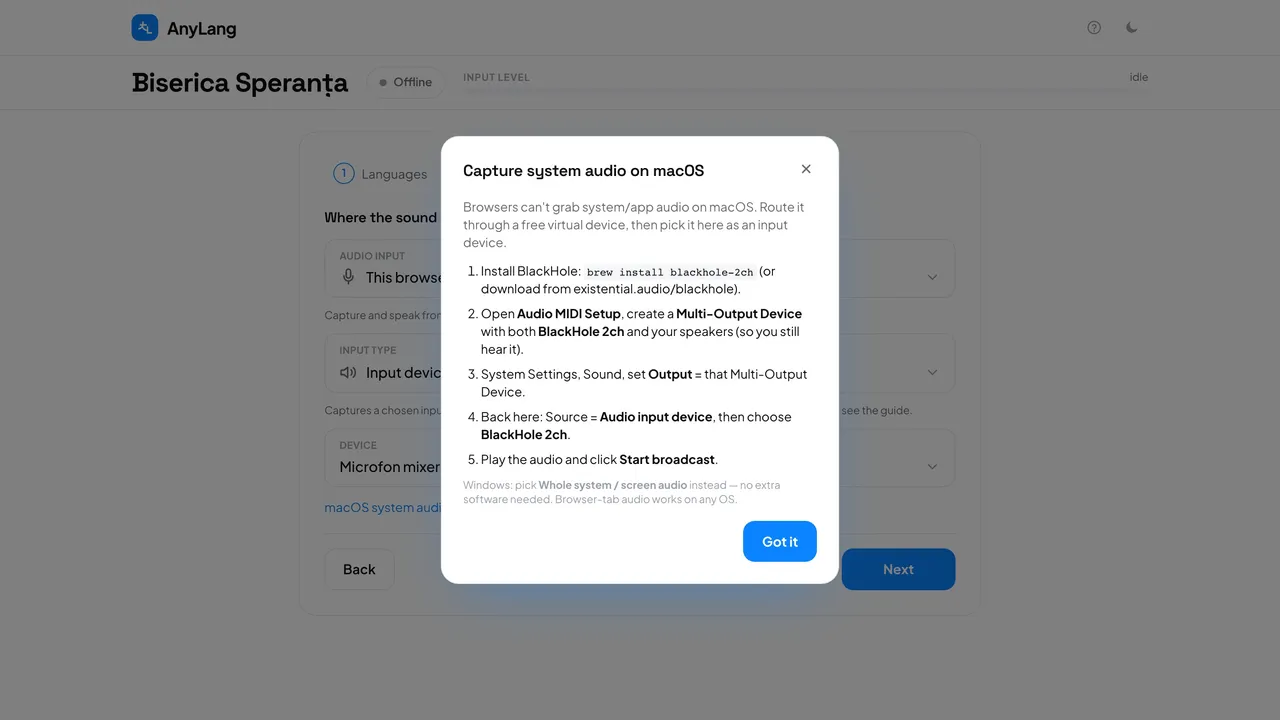
- Install BlackHole 2ch. Download it from existential.audio/blackhole, or with Homebrew run: brew install blackhole-2ch.
- Open Audio MIDI Setup and create a Multi-Output Device with both BlackHole 2ch and your speakers, so you still hear the sound.
- In System Settings → Sound, set Output to that Multi-Output Device.
- In the console, step 2 (Audio): choose This browser, set Input type to Input device, then Device to BlackHole 2ch.
- Play the audio and press Start broadcast.
Good to know: The console shows these same steps: choose Input device and press macOS system audio? Setup guide.
- I only need the sound of one video in the browser.
- Then you do not need BlackHole. Choose Browser tab, which works on a Mac as it is.
- What about Windows?
- No extra software is needed. Choose System audio.
- My speakers went quiet after the service.
- Set Output in System Settings → Sound back to your speakers.